![Straker AI Logo - Blue-Black - Horizontal_500ppi-2.png]](https://help.straker.ai/hs-fs/hubfs/Straker%20AI%20Logo%20-%20Blue-Black%20-%20Horizontal_500ppi-2.png?width=188&height=65&name=Straker%20AI%20Logo%20-%20Blue-Black%20-%20Horizontal_500ppi-2.png)
When you submit PDF documents for human translation, our platform uses the Adobe OCR tool to convert your PDFs into DOCX format before processing.
This ensures compatibility with our evaluation and translation tools, allowing for a consistent user experience and streamlined handling across file types. Please note that while you can upload PDF files, the files you receive back will be delivered as DOCX.
If you have specific formatting requirements or complex layouts in your PDFs, we recommend reviewing the converted DOCX output, as certain design elements may require adjustment post-conversion. For best results, submit source PDFs with clear, accessible formatting.
1. Drag and drop your PDF document
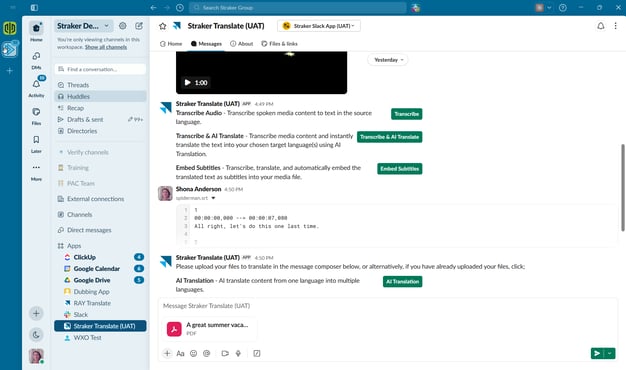
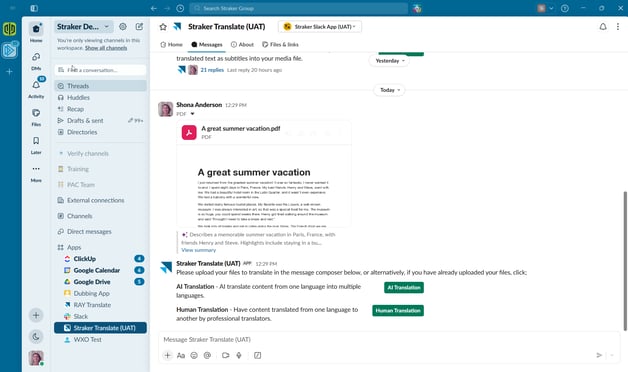
2. Click on the Human Translation button
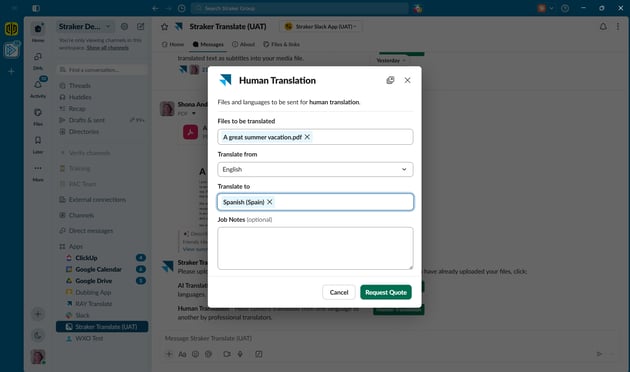
3. Choose your source and target language/s and press Request Quote
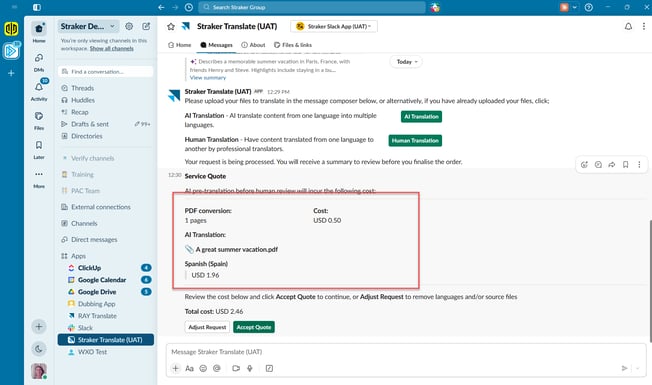
4. Prior to processing, you will be presented with a quote detailing the costs associated with PDF conversion and AI translation in preparation for Human Translation. The quote must be accepted before the process can proceed.
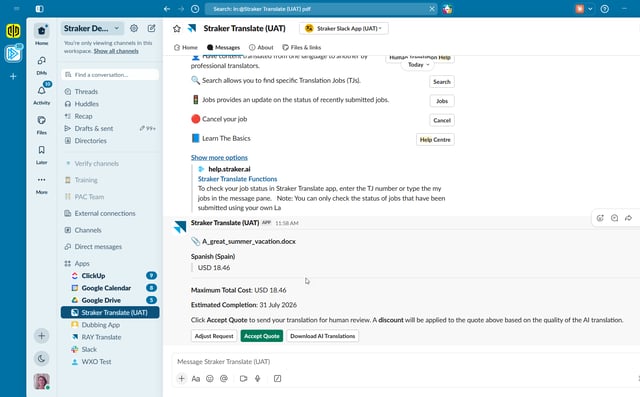
5. Review the Human Translation quote: once the PDF has been converted and AI-translated, the app posts the maximum Human Translation cost per target language, plus an Estimated Completion date. A discount will later be applied to this cost based on the quality of the AI translation. At this stage you can select Adjust Request to change languages or files, or Download AI Translations to get the machine-translated version straight away.
6. Finalize the request: select Accept Quote to send the file for human translation.
7. Automatic Quality Evaluation: Quality Evaluation runs automatically to assess the AI translation and apply the resulting discount to the final cost.
8. Download your translation once complete.
Tips for Best Results:
- Submit Original Source Files: Uploading original
.pptx,.docx, or native files directly gives the best output quality. - Avoid Multi-Step PDF Exports: Converting files through multiple tools (e.g., PowerPoint ➡️ Google Slides ➡️ PDF) breaks formatting.
- Review Output: Check your converted file, as complex design elements may still need minor manual adjustments.
Maximum file size: 1 GB
Returned format: DOCX